Christmas offers on Runic trackers. Save up to 51% until 25 December.

ENGINE LOCK · REMOTE IMMOBILISER

GPS tracker with engine lock: stop your vehicle from being started, from the app

With Runic you can prevent a vehicle's engine from starting. Turn on Engine lock in the app and the vehicle can't be started until you unlock it. Engine lock works with the hardwired Runic 4G (Connected Pro) and Runic 2G (Connected Basic) trackers.

Engine lock with Runic, at a glance

  • Prevents the engine from starting: while the lock is on, the vehicle won't start
  • Turn it on in the app with “Slide to lock engine”, or from the web portal
  • If it detects a jammer, the hardwired device can react on board with an engine immobiliser
  • On Connected Pro 4G (Teltonika FMC920) from €49 + VAT and Connected Basic 2G (Teltonika FMB920) from €39 + VAT
  • Plan from €48 + VAT per device per year, with SIM, data, app and portal included

What engine lock is

Engine lock is a feature of Runic hardwired trackers that prevents the engine from starting. While it's on, the vehicle can't be started; when you want to drive again, you unlock it from the app. It works alongside live tracking, so you always see where the vehicle is.

How to lock the engine from the Runic app

You send the command from your phone in a few seconds, on iPhone and Android.

  1. Open the vehicle and go to Information.
  2. Under Vehicle actions, find Engine lock.
  3. Use “Slide to lock engine” and confirm with “Lock engine”.
  4. The status changes from Unlocked to Locked; while the command is waiting you see “Lock requested”.
  5. To drive again, tap “Unlock engine”.

When the command is applied

The command is applied the next time the tracker connects. Until then the app shows “Lock requested” or “Unlock requested”, then the status changes to Locked or Unlocked.

From the web portal

You can do the same from the portal at portal.runic.io: open Position, select the vehicle and use Engine lock under Vehicle controls, with “Lock engine” and “Unlock engine”. Handy if you manage several vehicles from a computer.

If a thief uses a jammer

No product neutralises a jammer, but a tracker can detect one and react locally even while transmission is blocked: on a hardwired device, with an engine immobiliser that prevents the vehicle starting. The last position before the blackout stays in the cloud, and the tracker resumes reporting the moment the jammer is switched off. Worth enabling? It depends which risk you prefer: it may drive thieves off, but it reveals that a tracker is fitted. If recovery is the priority, many owners leave it off and hide the device well.

Parking alarm, on the same screen

Next to Engine lock you find the Parking alarm: when it is on, you get an alert if the vehicle starts moving. Together they tell you straight away when something is wrong and stop the vehicle from being started.

Which Runic trackers have engine lock

Engine lock is available only on the hardwired trackers: Connected Pro 4G (Teltonika FMC920, €49 + VAT) and Connected Basic 2G (Teltonika FMB920, €39 + VAT). The plug-in OBD trackers (OBD Basic and OBD Pro) do not offer engine lock. Hardwired devices need professional installation.

What it costs

You buy the tracker once, then choose a plan: €7 a month or €48 a year per device, plus VAT. The plan includes SIM, data, the app and the web portal. Fleets with specific needs can ask for a custom Enterprise plan. Support is available in any language.
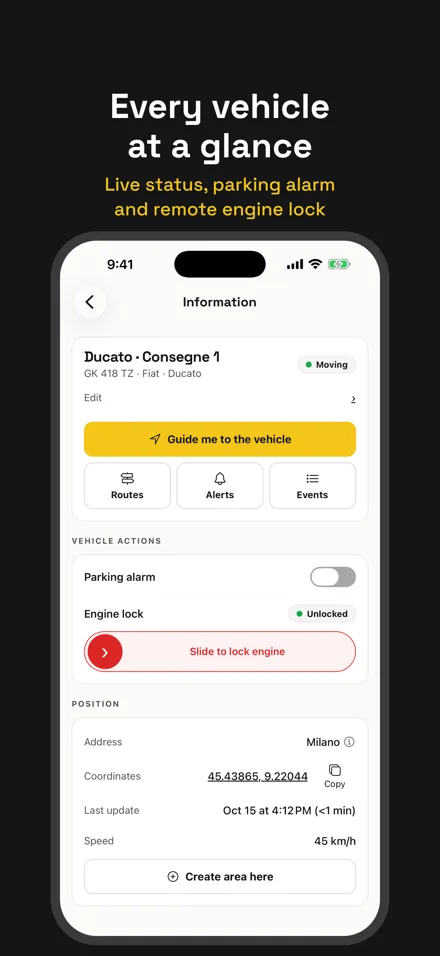
Runic app Information screen with Vehicle actions, Parking alarm and the “Slide to lock engine” control
In the Runic app, Engine lock sits under Vehicle actions, next to the Parking alarm.

Engine lock FAQ

How does engine lock on a GPS tracker work?

With Runic you can prevent a vehicle’s engine from starting. On a hardwired Runic 2G or 4G tracker, open the vehicle in the app, go to Information → Vehicle actions → Engine lock and use “Slide to lock engine”, then confirm. Once the lock is on, the vehicle can’t be started until you tap “Unlock engine”. The command is applied the next time the tracker connects. You can do the same from the Runic web portal.

Can the engine lock kick in if a thief uses a jammer?

Yes, on the hardwired trackers. Nothing neutralises a jammer, but a tracker detects one and can trigger an engine immobiliser locally, even while transmission is blocked, so the vehicle can’t be started. The last position before the blackout stays in the cloud. Whether to enable it depends which risk you prefer: it may drive thieves off, but it reveals that a tracker is fitted.

Which Runic GPS trackers have engine lock?

Connected Pro 4G (Teltonika FMC920, €49 + VAT) and Connected Basic 2G (Teltonika FMB920, €39 + VAT) support engine lock. They are hardwired devices and need professional installation. The plug-in OBD trackers (OBD Basic and OBD Pro) do not offer engine lock.

What happens when I turn engine lock on?

The vehicle can’t be started while the lock is on. When you want to drive again, tap “Unlock engine” in the app or in the portal; the command is applied the next time the tracker connects.

Do I need an installer?

Yes. The trackers with engine lock are hardwired and need professional installation. If you want a tracker you can fit yourself, the plug-in OBD models (OBD Basic and OBD Pro) go into the diagnostic port, but they do not offer engine lock.

How much does a Runic GPS tracker with engine lock cost?

Connected Pro 4G costs €49 + VAT and Connected Basic 2G €39 + VAT, one-off. Then there is the plan: €7 a month or €48 a year per device, plus VAT, with SIM, data, app and web portal included.

Which languages is support available in?

The Runic team offers support in any language, by email and phone.

Want engine lock on your vehicle?

Engine lock is available on the hardwired 4G and 2G trackers. Compare the models and pick the one that fits.

Choose a hardwired tracker